Getting started

Nothing to buy. Nothing to install.

StarCraft II multiplayer is free to play, and that includes Custom games and melee mods. Wildcard Arena is a melee mod, not an Arcade map. It loads with the lobby, so there is no separate download, no launcher and no client patch.

From the SC2 main menu to a game

  1. Open Custom, then Melee

    Melee and Arcade are both tabs under Custom, so getting this far is not enough. You want the Melee tab. Wildcard Arena is a melee mod, and it sits alongside the normal unranked 1v1 and team games.

  2. Select any melee map

    Any standard melee map works. There is no special map.

  3. Click Create with Mod

    This is the button that lets a melee lobby load a mod on top of the map you picked.

  4. Search Wildcard Arena and select it

    Type the name into the mod search, pick it from the results, and confirm.

  5. Click Create Game

    Set up the lobby as usual. Wildcard Arena supports 1v1 up to 4v4.

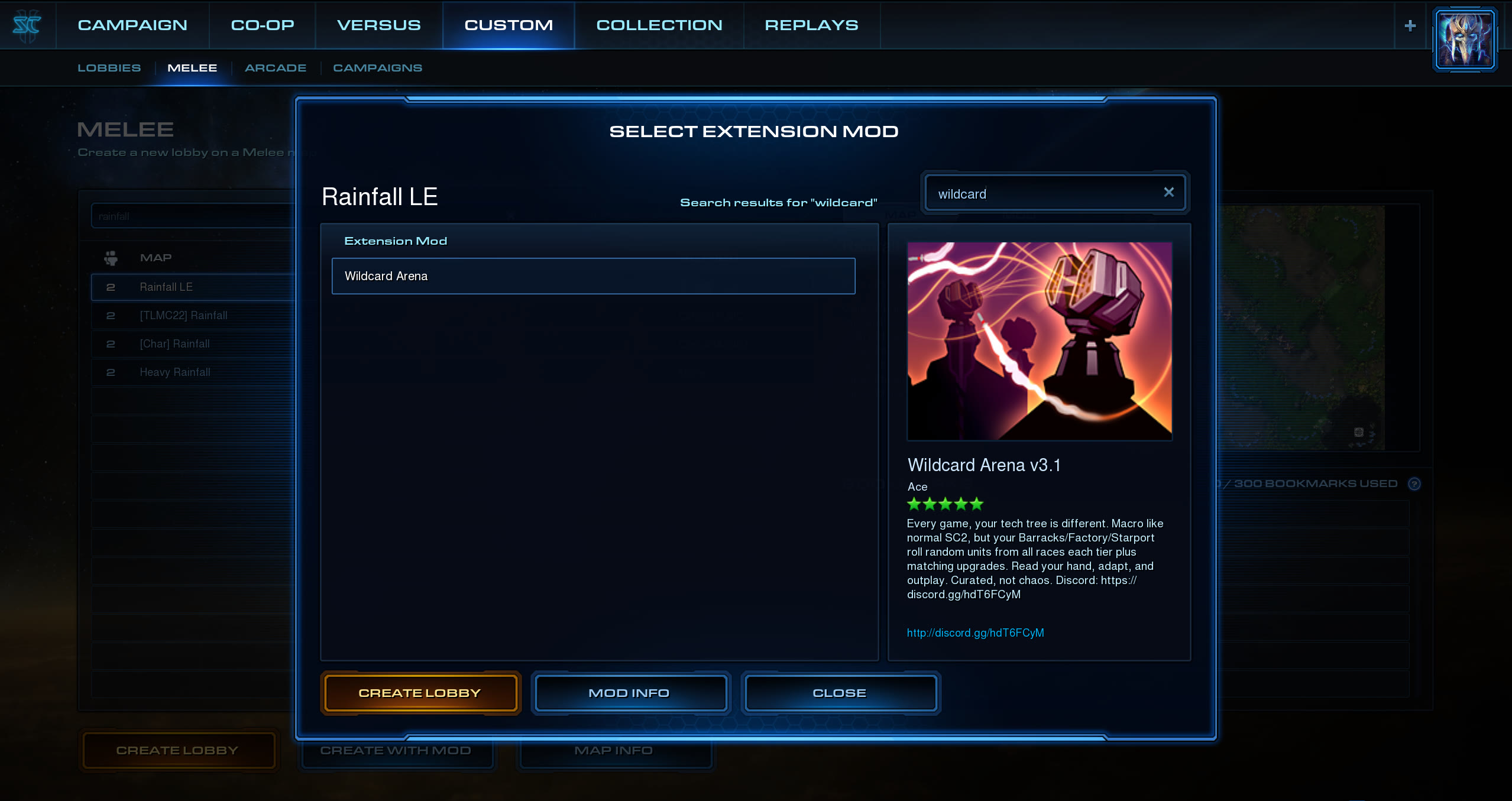
StarCraft II's Select Extension Mod dialog, reached from Custom then Melee. A search for “wildcard” returns Wildcard Arena, selected, with its store listing on the right and a Create Lobby button below.
Steps 3–4: Create with Mod, then search for Wildcard Arena.

Your first game

Five things that aren’t like standard StarCraft

Everything else plays like the melee game you already know: same economy, same buildings, same controls.

The race you pick does nothing

You still choose a race in the lobby, but it has no effect on the game. Your production buildings are stocked with units from all three races regardless of what you picked. If you selected Zerg and got handed Marines and Stalkers, nothing has gone wrong.

Check your faction before you build

The “Your Faction” panel opens at the start of every game and shows every unit you rolled with its paired upgrade, grouped by facility. The FACTION tab on the left edge reopens it any time. Hover any icon for the full tooltip.

An add-on unlocks the top slot

Tech Lab unlocks Barracks slot 4, Reactor unlocks Factory slot 3, Tech Reactor unlocks Starport slot 3. Add-ons do not double production here. Each facility builds exactly one add-on type, on the X key by default.

Upgrades research at the tech buildings

Barracks units research at the Ghost Academy, Factory units at the Armory, Starport units at the Fusion Core. Each unit can research exactly one upgrade.

Scout, because rolls are per player

Vision of an enemy production building shows what it can build; vision of a tech building shows what it can research. It is fog-gated, so the information only lasts as long as the vision does.

Find an opponent

Wildcard Arena runs 1v1 up to 4v4. The Discord is the fastest way to find someone, and where anything new gets announced first.

Solo and co-op

Prefer vs AI? Try survival maps

Adding a computer opponent on a normal melee map does not really work. The melee AI does not understand a rolled faction. If it rolls Terran units it might fight you, but it can just as easily sit there massing Medivacs.

Survival maps work properly, because the attack waves are scripted rather than played by the AI. The flow is identical to a normal game. You just pick a survival map at step two.

Known to work

Redstone Zerg Survival

1–3 players, co-op

Custom → Melee → select Redstone Zerg Survival → Create with Mod → pick Wildcard Arena → Create Game. Works with the mod as-is, solo or with friends.

The map is by Tacobella and is not part of Wildcard Arena. It simply works well with it.